Stop retyping test scores.
Hansym reads supported publisher score-report PDFs and fills the corresponding score tables in a dated copy of your practice’s existing Word report template.
Request a demo See the four stages ↓
Your existing Word template · No generative AI touching scores · Unverifiable values are flagged, not guessed · Assessment and report data stays local
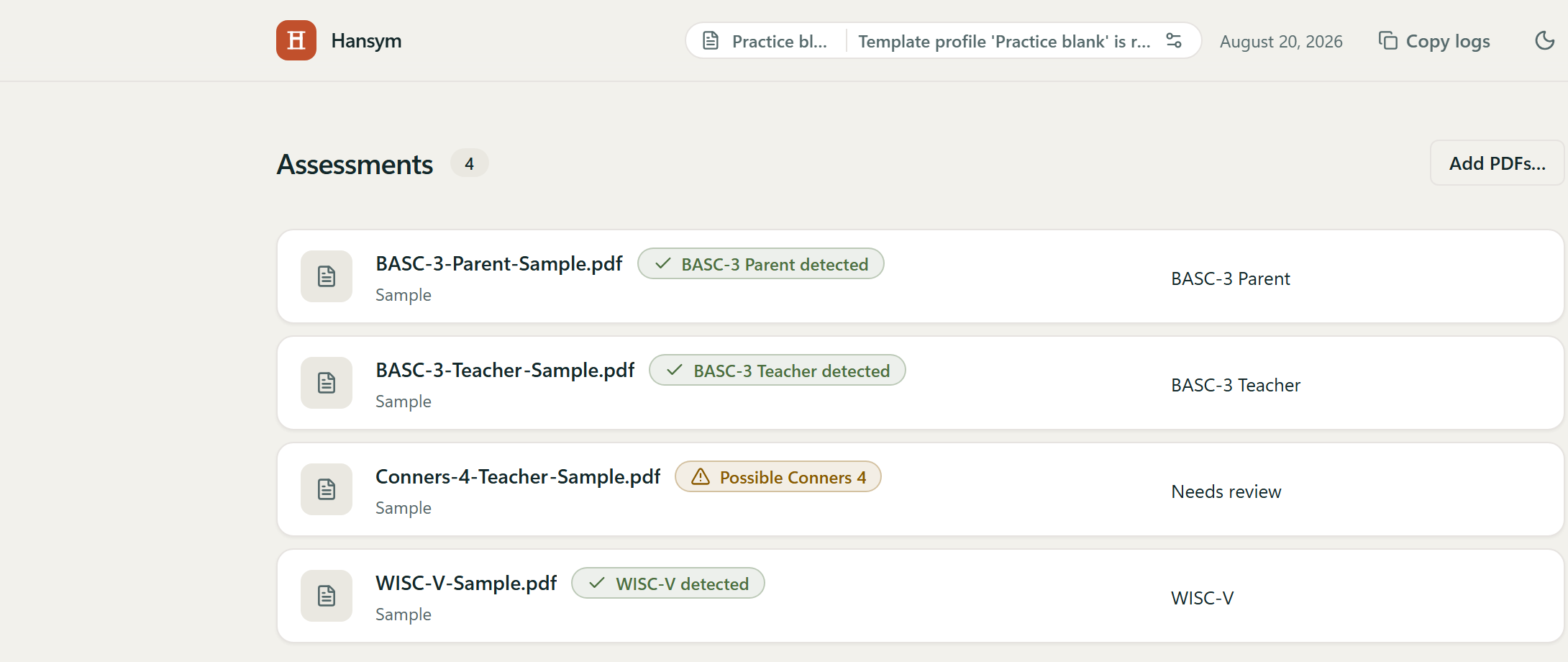
From publisher PDFs to your report tables.
-
1.0 · Add
Add digital score-report PDFs from supported publishers. Hansym identifies each assessment and reads the scores it supports.
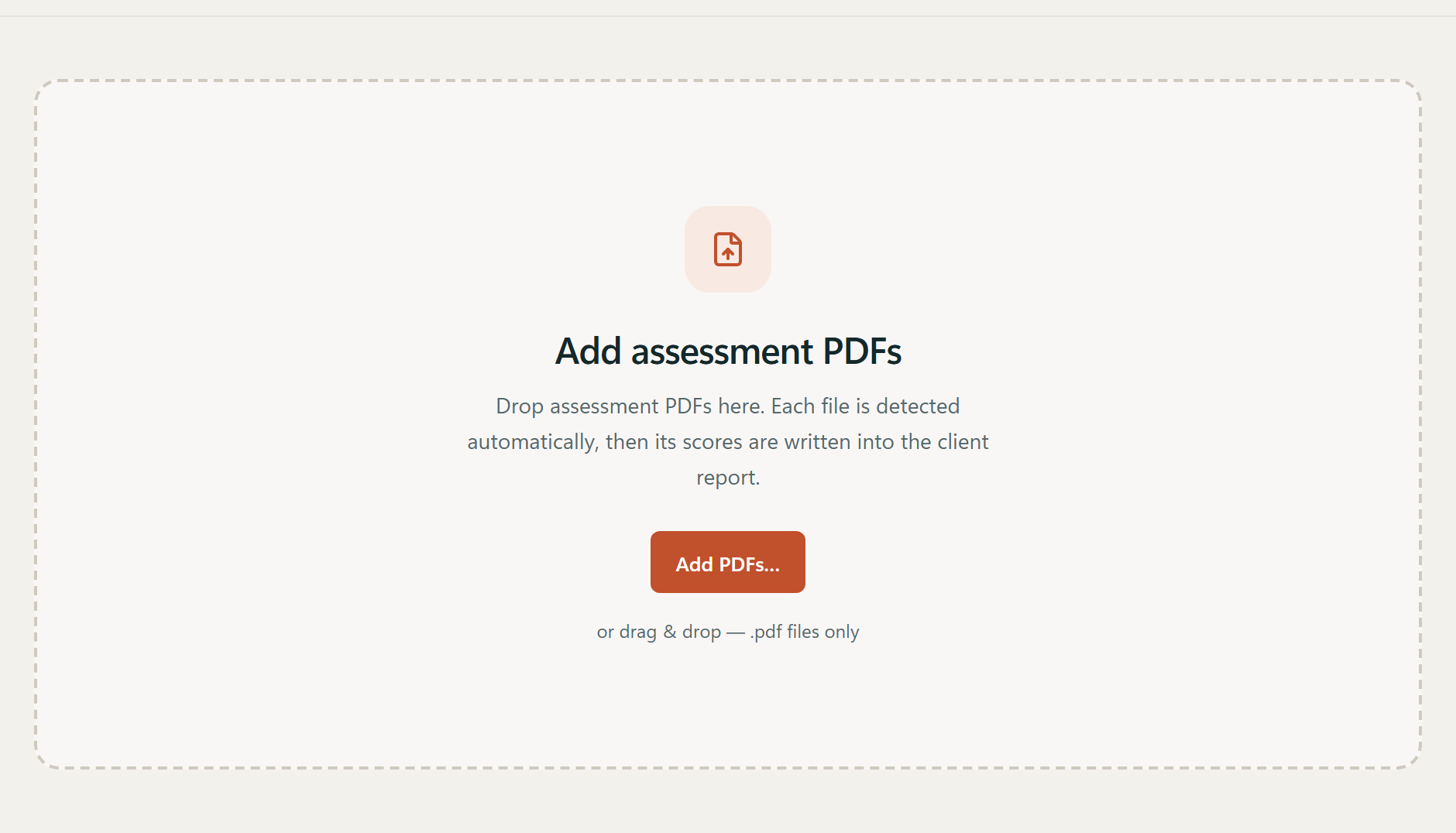
-
2.0 · Review
If Hansym cannot verify a file, it flags it for your review before generating the report. You can correct the assessment label in the queue.
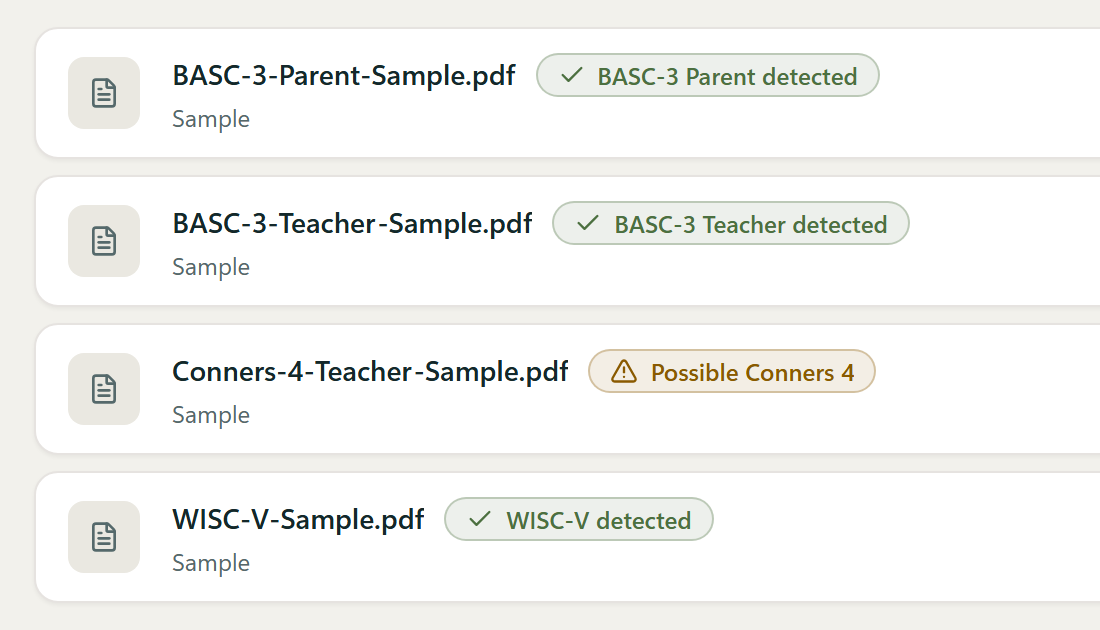
-
3.0 · Generate
Hansym fills the mapped cells in a dated copy of your prepared Word template, leaving diagnoses, interpretations, recommendations, and other clinical narrative to you.

-
4.0 · File
The completed Word file is saved directly to your computer.
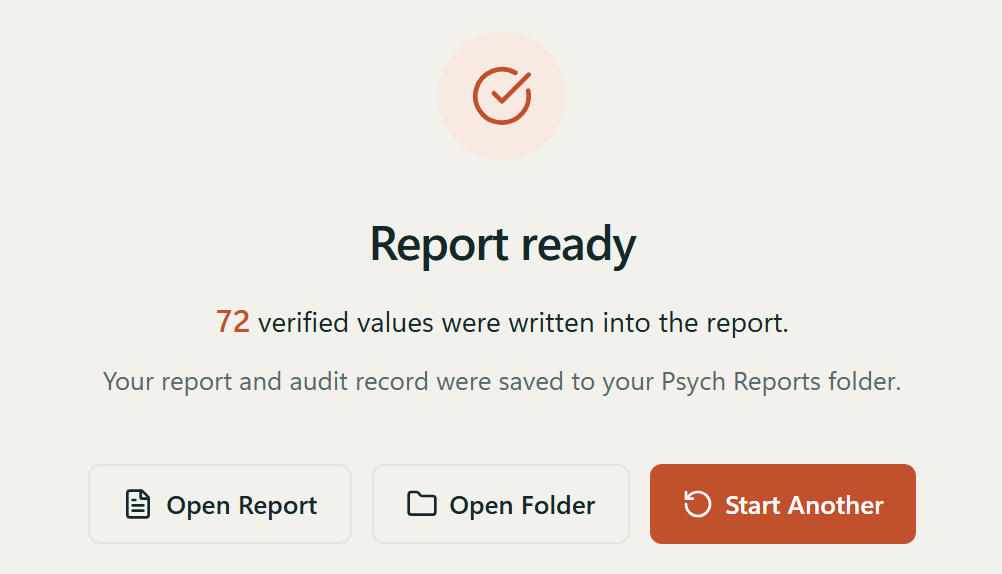


That’s the whole run. See the full process → or request a demo →.
Know exactly what Hansym can write.
Coverage depends on the specific form and source. Hansym shows each assessment’s coverage before writing anything.
- Writes score cells today 11
-
- BASC-3 Parent · Teacher
- BRIEF2A (Adult) Self-Report Interpretive Report
- BYI-2 Self-Report
- CAARS-2 full-length Observer, spouse or partner
- CEFI Teacher; Parent when the printed relationship resolves to Mother
- Conners 4 full-length Teacher; Parent when the respondent is the mother
- CPT-3 Single Administration Assessment Report
- D-KEFS Verbal Fluency
- WAIS-V Score Report primary composites and subtests
- WISC-V combined Score Report
- WRAT-5 combined Score Report, grade-based norms
- Detected, routed to review 5
-
Hansym recognizes these assessments and sends them to the review list without writing any cells. Their scores are still entered by hand.
- ASRS Adult
- PAI
- CVLT-3
- WMS-5
- K-CPT 2
- Planned / not currently available 12
-
Named in the app’s assessment list but not writable. There is no release date for any of them, and none should be planned around.
- Raven’s 2
- WPPSI-IV
- WAIS-IV
- Vineland-3
- WIAT-III
- CEFI-A
- BRIEF-A
- Conners CBRS
- BASC-3 PRQ
- Sensory Profile 2
- SRS-2
- CARS-2 ST
Every form and source restriction, in full: Assessment coverage →

Assessment and report data stays on this computer.
Drawn for this page

Captured from the app
This seal appears when the report is ready.
Sent to our licensing server
license key · salted one-way machine-fingerprint hash · the operating system (always “windows”) · app version · server IDs
Never sent
assessment or report content · scores · file names · paths · hostnames · usernames
An automated test checks this list in every build. It is our own test, not an independent audit.
Extraction, review, and report generation all happen on the Windows computer. Hansym does not send assessment or report data to the cloud, and it does not use generative AI to generate scores.
Hansym connects to our licensing server for activation and periodic validation, using a single domain we share during onboarding. That connection sends only the licensing information listed above.
Hansym does not receive, maintain, or access the assessment or report data it processes. Hansym does not make or guarantee your practice’s HIPAA compliance; that remains your own program. Your compliance counsel should decide whether this affects any business-associate obligation, and we can walk them through the list and the test that checks it.
License files are signed and encrypted at rest, and the app keeps working for 14 days without a server connection. Releases are signed — Azure Artifact Signing, RFC 3161 timestamp, SHA-256 checksum shipped with each release.
Built for a controlled report workflow.
| Platform | Windows desktop · a single program file | releases signed via Azure Artifact Signing · RFC 3161 timestamp · SHA-256 checksum |
|---|---|---|
| Input | Digital score-report PDFs | scanned or photographed reports are not supported |
| Output | Dated Word copy + audit record | saved in your Documents folder, under Psych Reports |
| Template | Your practice’s existing Word document | you import it yourself at setup · the master is never modified |
| Classification | Fixed bands computed from score ranges | never trusted from the PDF’s own text |
| Network | Licensing only | what it sends is checked by an automated test in every build |
| Offline | 14-day grace | report generation pauses after that; your files stay put |
Read the full security and privacy details →
One Windows seat. Template onboarding included.
Hansym is for practices that use a repeatable assessment battery and Word report template. Template onboarding is included — you import your own template on your own computer — and each seat covers one Windows computer.
Seat license
$249.99 per seat / month
Or $2,499 per seat / year — two months free.
- Template onboarding included — your blank template is checked with you, and you import it yourself
- Licensed per computer — one seat, one Windows machine
- Release the seat yourself when you move to another machine
- 14-day offline grace before the licensing server must be reached
- A lapsed subscription stops report generation — never your data
- No trial and no self-service download; sales are demo-led
Before you request a demo.
What exactly does Hansym automate?
One step: moving scores from publisher score-report PDFs into your report tables. You add the PDFs, and Hansym reads the supported scores and fills the corresponding cells in a dated copy of your practice’s Word template. Everything before and after that step stays yours.
Does Hansym write the clinical narrative?
No. Hansym enters numbers and their classification bands in the corresponding table cells. It leaves history, behavioural observations, interpretations, diagnoses, recommendations, and any narrative you have written unchanged. A qualified clinician must review the final report; automation does not replace clinical judgment.
Which assessments and forms can Hansym fill today?
Eleven assessments write score cells today, each under a specific verified form or source contract — for example BASC-3 Parent and Teacher, but not Self-Report; the BRIEF2A (Adult) Self-Report Interpretive Report, but not the BRIEF2 Parent, Teacher, or child and adolescent Self-Report forms. Five more are detected and routed to review without being written. The assessments page lists every form and source restriction in full.
Will Hansym work with our existing Word report template?
Template onboarding is included, and Hansym ships with no template inside it: you import your own blank Word template on your own computer. Before you buy, we run the shipped analyser over the exact blank template you send and tell you in writing which assessments have a destination in it. At import, the review screen shows each destination for you to confirm — a normal step, not a fault. If a table cannot be used as written, we tell you during onboarding and say what to correct.
What happens when Hansym cannot verify a value?
It refuses to guess. Unverifiable values are routed to the run’s review list and left for you, and an ambiguous battery stops before any file is created. A measure the source reports as not administered is left untouched and noted in the review list rather than filled in.
Does assessment or report data leave our computer?
No. Extraction, review, and report generation all run on the Windows computer, and there is no cloud component to send assessment or report data to. The application does make one network call: a licensing handshake with our licensing server, carrying a license key, a salted one-way machine-fingerprint hash, the operating system (always “windows”), the app version, and server-issued IDs. It never carries file names, paths, scores, hostnames, usernames, or report content.
Does Hansym use generative AI?
No. Hansym uses fixed rules for each assessment to read scores; it does not use generative AI to generate or interpret them. Fixed rules do not remove the need for review, so Hansym creates an audit record and a clinician reviews every report.
What is Hansym’s relationship to HIPAA and BAA obligations?
Hansym does not receive, maintain, or access the assessment or report data it processes — that data stays on the Windows computer, and only licensing metadata reaches our licensing server. Hansym does not make or guarantee your practice’s HIPAA compliance; that remains your own program. Whether that data-access architecture changes any business-associate obligation is a question for your compliance counsel, and we will walk them through the published allowlist and the test that pins it.
Can Hansym read scanned score reports?
No. Hansym reads digital score-report PDFs exported by a test publisher’s scoring platform. It cannot read scanned or photographed reports.
Does Hansym run on Mac?
No. Hansym runs only on Windows. Each release is signed through Microsoft’s Azure Artifact Signing service, carries an RFC 3161 timestamp, and includes a SHA-256 checksum.
How is a seat licensed?
One seat licenses one Windows computer, monthly or annually. When you move to another machine you release the seat yourself — no support ticket. If a subscription lapses, report generation stops but your data does not: templates, reports, and audit files are ordinary files on your disk and stay there.
What happens when we are offline?
Hansym keeps generating reports for up to 14 days without reaching the licensing server. After that, generation pauses until the app can reach it again. Your reports, templates, and audit files are unaffected either way.
Is there a trial?
No trial, and no self-service download. Sales are demo-led: the demo is where you see a complete run and we establish whether your assessments and your template are a fit before anyone pays for a seat.
What happens during the demo and onboarding?
The demo is a complete run on sample data — publisher score-report PDFs in, a filled copy of a Word report template and its audit record out. Nothing to install, and no client data required. If you go ahead, we check your own blank template in writing before purchase, and you import it yourself on your own computer at the installation call, confirming each assessment’s destination on the review screen.
See Hansym fill a Word report.
A demo is a complete run on sample data: publisher score-report PDFs in, a filled copy of a Word report template and its audit record out. Nothing to install, and no client data required. If your battery and your template fit, you import your own blank template yourself, on your own computer, at the installation call.
Opens Cal.com in a new tab to pick a time — an ordinary outbound link, not embedded on this page. This site makes no request to Cal.com until you click.
Windows only · Digital publisher PDFs only, no OCR · No generated clinical narrative